Warehouse Networking Setup (Hardware)
Of course, The Warehouse needs a proper networking setup, but I may have overdone it for a two-person workspace...
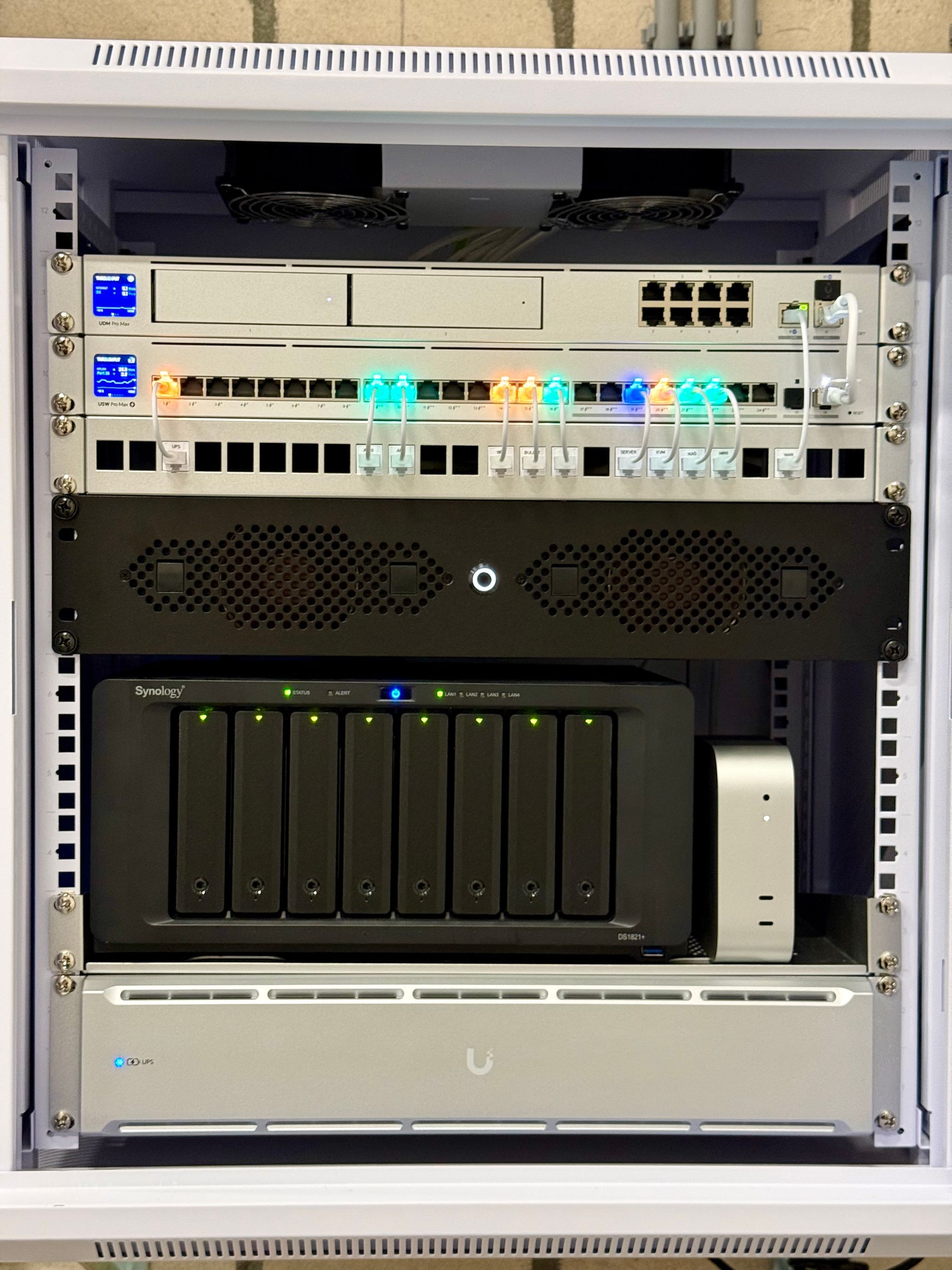
Pictured below, top to bottom (in a wall-mounted Ubiquity 12U Slim Rack (opens in a new tab)):
- Dream Machine Pro Max (opens in a new tab) router
- 22TB WD Purple Pro hard disk drive (opens in a new tab) for camera image storage
- Pro Max 24 PoE switch (opens in a new tab) (connected to the router over 10G SFP+)
- 24-Port patch panel (opens in a new tab)
- MyElectronics 2U short-depth mini-ITX case (opens in a new tab)
- ASUS ROG Strix B760-I motherboard
- Intel Core i5-14500
- 2 * 36GB DDR5 RAM
- 2 * 500GB Samsung M.2 SSD 980
- Corsair SF750 power supply
- Sipeed NanoKVM (opens in a new tab) (PCI PoE KVM that exposes HDMI and USB over the network)
- Synology DS1821+ (opens in a new tab) with 8 * 20TB WD Ultrastar DC HC560 (opens in a new tab) in RAID 6 (about 105TB usable space)
- Apple Mac Mini M4 Pro (1TB SSD, 48GB "unified memory")
- UPS 2U (opens in a new tab)
- A whole bunch of Etherlighting patch cables (opens in a new tab)
Then, running from the top of the rack, a few hundred meters of Cat6 CMR UTP cable (opens in a new tab) to connect two Ubiquity IP camera's and a doorbell (more on that later), and two U7 Pro XG access points (opens in a new tab). The APs are ceiling mounted in both offices, and easily cover the entire actual warehouse space, too (as well as the parking lot). Definitely the best Unifi APs I've used over the years, and should be easily able to serve hundreds of wifi clients simultaneously.
More on the networking setup and homelab server in a next installment!